- AI
- Product Management
AI Tools for Product Managers: What to Use for Each Part of the Job

Short answer: The most useful AI tools for product managers depend on the part of the job. General assistants like ChatGPT and Claude help with research and first drafts. Meeting note-takers capture calls. The AI built into your tracker summarizes and organizes issues. An AI project manager like Thor keeps specs, tickets, and the roadmap in step across tools. Most PMs on software teams end up using two or three.
Most lists of AI tools for product managers are 25 logos long. That’s not much help when you have a spec due Thursday.
A better way to pick is by job. A product manager’s week breaks into a handful of recurring kinds of work, and AI is good at some of them and bad at others. So this guide goes job by job: what AI can do, which kind of tool does it, and where it still needs you.
Full disclosure: we build Zenhub and Thor, and Thor is one of the tools below. We’ve tried to describe every category, ours included, the way we’d describe it to a friend.
What can AI do for a product manager?
AI can take on the reading, drafting, and upkeep parts of product management: summarizing research and feedback, drafting PRDs and user stories, capturing meeting decisions, keeping tickets and roadmaps current, and preparing status updates. Deciding what to build, what to cut, and what to say no to still belongs to the product manager.
That split matters. The PM job has always been part judgment, part clerical. AI is now good enough at the clerical part that doing it by hand is a choice.
AI tools for product managers, by job
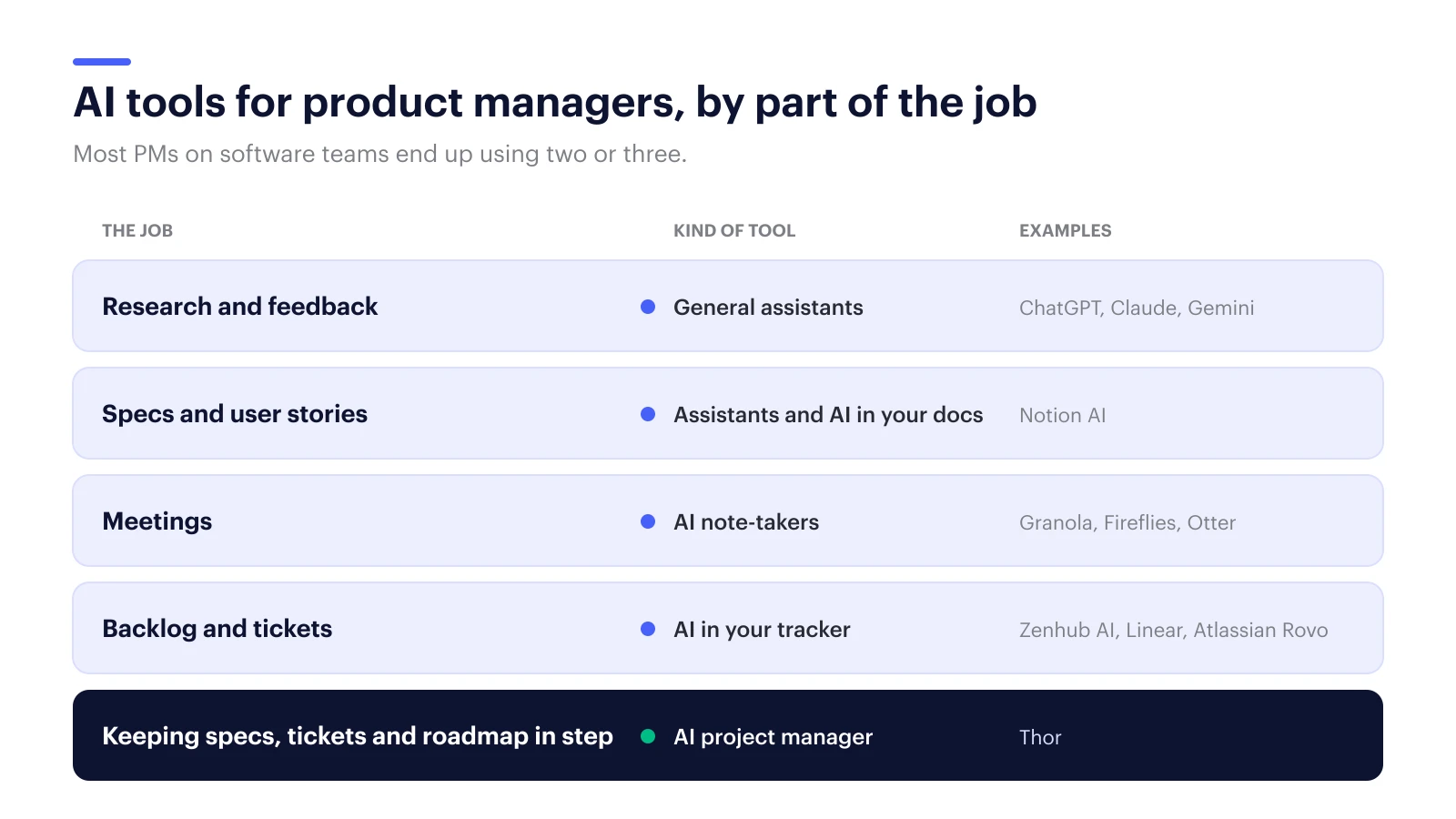
| Job | Kind of AI tool | Good at | Falls short when |
|---|---|---|---|
| Research and customer feedback | General assistants (ChatGPT, Claude, Gemini) | Summarizing interviews, clustering feedback, first drafts | The answer needs your company’s history; every answer is a fresh guess |
| Writing specs and user stories | General assistants, AI in your docs tool (Notion AI) | Fast first drafts | The draft agrees with the first plausible answer instead of pushing back |
| Meetings | AI note-takers (Granola, Fireflies, Otter) | Capturing what was said | Someone still has to turn notes into owned work |
| Backlog and tickets | AI built into your tracker (Linear Agents, Atlassian Rovo, ClickUp Brain) | Summarizing and organizing work inside that tracker | Decisions happen in Slack, meetings, or docs |
| Keeping specs, tickets, and roadmap in step | AI project manager (Thor) | Updating your tools from what was decided, across GitHub, Linear, Slack, and meetings | Your team works in one tool and rarely meets |
[Verify: tool names come from /foundations/competitive/landscape.md. Before publishing, run the competitive-analysis skill (Light) on any tool we describe beyond its category, and date the check.]
Research and customer feedback
This is where general assistants shine. Paste in ten interview transcripts and ask for the recurring complaints, ranked by how often they came up. Ask it to pull every quote about onboarding. Ask for the three customers who’d make the best beta testers and why.
The catch: a general assistant only knows what you paste in. It doesn’t know that you tried this exact feature in 2024 and pulled it. You have to bring that context every time.
Writing specs and user stories
AI is fast at first drafts. Give it a problem statement and it’ll produce a PRD outline, user stories, and acceptance criteria in under a minute.
The weakness is subtle. Models tend to agree with you. They take the framing you gave them and fill it in, instead of asking the awkward question: “didn’t the team decide against this in March?” The spec looks complete and it’s built on an assumption nobody checked.
The fix is a tool that pushes back before you commit. That’s what Thor does with a plan. You bring Thor your plan before you build, and it checks it against what your team has already decided, shipped, and left unfinished.
Meetings
AI note-takers are mature and most of them are good. You’ll get a clean summary and a list of action items after every call.
What you won’t get from most of them is follow-through. The action items sit in the summary. Three weeks later, half of them never became tickets, and nobody noticed because everyone assumed someone else filed them.
Backlog and tickets
If your team works in one tracker, its built-in AI is the obvious place to start. Summarizing a long issue thread, breaking an epic into sub-tasks, and drafting acceptance criteria all work well inside the tool.
The limit is the walls. The tracker’s AI knows what’s in the tracker. The decision that changed the plan was made in Slack yesterday. For more on running refinement well, see our guide to backlog grooming. [Link goes live with that post.]
Keeping specs, tickets, and the roadmap in step
This is the newest category, and the one we build in. An AI project manager doesn’t replace any of the tools above. It sits across them and does the upkeep a PM usually does by hand: turning meeting decisions into tickets, keeping tickets in step with what was decided in Slack, and noticing when the roadmap and the work have drifted apart.
Thor is an AI project manager for software teams, from the team behind Zenhub. It works in GitHub, Linear, Slack, and your meetings, and uses Notion and Google Docs as context. It writes and questions specs using what your team has actually decided, so you’re not relitigating old decisions. Every change it proposes has a source and an undo, and nothing becomes official until you approve it.
How to choose AI tools as a product manager
Start with the job that eats the most of your week, not the tool with the best demo. Prefer tools that work inside the apps your team already uses, that show where every suggestion came from, and that ask before they change anything. Try one for two weeks and drop it if nobody misses it.
A few rules that hold up:
- Count the hours first. Track one week of your own work. The biggest block of clerical time is your first target.
- Avoid a new place to live. A tool your engineers have to open every morning won’t last. Tools that work inside GitHub, Linear, and Slack will.
- Insist on sources. If an AI summary can’t show you which interview or meeting it came from, you can’t defend it in a review.
- Keep the judgment. Let AI draft and update. Don’t let it decide priority.
FAQ
What is the best AI tool for product managers?
There isn’t one best tool, because the job has several parts. Most PMs on software teams use a general assistant for research and drafting, a note-taker for meetings, and either their tracker’s built-in AI or an AI project manager like Thor to keep specs, tickets, and the roadmap current.
Can AI write a PRD?
Yes, AI can write a solid first draft of a PRD from a problem statement or meeting notes. The risk is that it fills in the framing you gave it without questioning it. Use a tool that checks the plan against past decisions, and review every assumption before the team builds on it.
Will AI replace product managers?
No. AI is taking over the reading, drafting, and upkeep parts of the job. Deciding what to build and what to cut, and owning those calls with customers and the team, still needs a product manager.
How do product managers use AI with Jira or Linear?
Through the tracker’s built-in AI for summaries and sub-tasks, or through a tool that updates the tracker from decisions made elsewhere. Thor works with GitHub and Linear today: it drafts and updates issues from meetings and Slack, and you approve each change.
If your week goes to keeping specs and tickets in step with what was decided, Thor can take the upkeep. It won’t change anything without asking first.